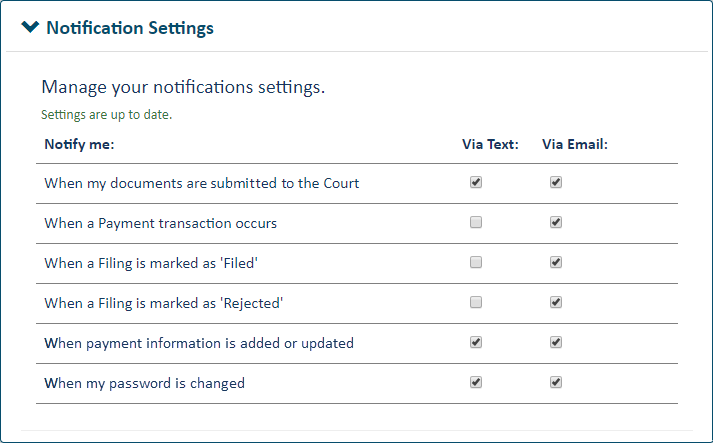
You can be notified when:
When your filing documents are submitted to the court
A payment transaction occurs
You'll also receive this notification when an ad hoc payment occurs.
If a payment is rejected, you'll be notified if you have selected either "When a Payment transaction occurs" or "When a Filing is marked as Rejected."
The payment transaction status email notification will not be sent if a payment is made via an inter agency transfer.
You won't be notified if the payment amount is $0.00.
Your filing is marked as Filed or Rejected
By default, you'll be notified when a filing is marked as Rejected and when a filing is marked as Filed. You can change those settings here.
Payment information is added or updated
This notification helps ensure the security of your TrueFiling payment accounts. If you didn’t add a payment account or modify an existing one, but you receive this notification, your payment accounts may have been compromised. Your notification will contain a link you can select to launch TrueFiling and access your payment account information.
Your password is changed
This notification helps ensure the security of your TrueFiling account. If you didn’t change your password, but you receive this notification, your account may have been compromised. Your notification will contain a link you can select to launch TrueFiling and reset your password.
In some courts, a Clerk can send an email message to a filer through the court's filing review process. This notification setting is not configured through TrueFiling.
The comments in the email will be displayed on the Status Updates tab on the History page and in the Filings section of the Case Details page. Its status will be “In Progress.”
To select your settings:
Click Settings under Main Pages in the navigation pane.
Expand the Notification Settings pane.
If you want to be notified via text message, your contact information must include a validated mobile phone number.
Select the appropriate option and notification method.
You'll receive one notification for each action applied to each filing you submit.
Some courts may eNotice (email) a filer when their filing is either filed or rejected irrespective of their notification settings.
If you were served a filing that was subsequently rejected by the court, you may receive a rejection notification email about that filing.
If TrueFiling can't deliver notifications or eServed filings to your email address, you'll be notified via an email bounce notice dialog when you log in to TrueFiling. It will resemble:
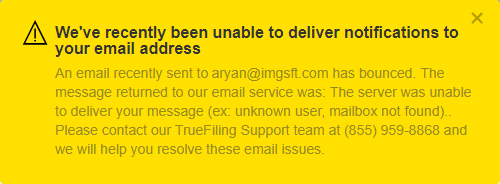
Contact TrueFiling Support to resolve the issue.